
Workflow Scripts (HP ALM/QC)
This is a technical entry with my research-and-experiment notes. Feel free to add or argue. Try at your own risk.
I continue my study journal figuring out HP ALM configuration. This entry is about issue-specific calls.
Overview
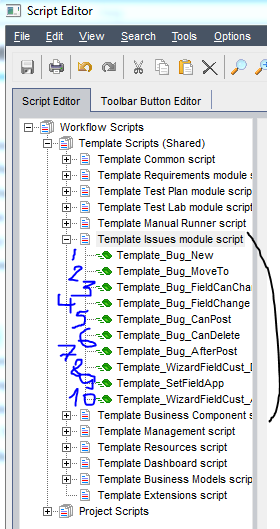
While creating or editing issue entries, users trigger internal ‘events’ in the ALM engine. Each event has a corresponding VBScript function or sub-routine called when the event is triggered. 10 events are available (see 1-10 on the picture):
- Bug_New - Called when a “New Issue” dialog has been opened.
- Bug_MoveTo - Called when “Issue Details” dialog has been opened.
- Bug_FieldCanChange - Called after user provided input and before changing the value of the field.
- Bug_FieldChange - Called after value of the field has been changed.
- Bug_CanPost - Called after user submitted the data with Bug_New or Bug_MoveTo dialog.
- Bug_CanDelete - Called before deleting an issue from the server.
- Bug_AfterPost - Called after the data have been saved to the server.
- WizardFieldCust_Details - Called to execute customization for Issue Details with Script Generator.
- WizardFieldCust_Add - Called to execute customization for Add Issue with Script Generator.
- SetFieldApp - is not an event handler but a generic function used by other handlers to set data field properties.
Note that function names are hard-coded. Regardless of bug name (bug, issue, defect, etc.) event names and function names stay the same. However, for template project, the respective prefix is added.
Data Objects
The following main Data Objects are available in the namespace of the functions.
Bug_Fields(“-reference by DB name-“) object - provides read/write access to the properties of the Issue.
Assorted examples.
Bug_Fields("BG_STATUS").Value = "New"
If (FieldName = "BG_USER_TEMPLATE_11") Then
    Template_Bug_FieldCanChange = False
End If
If Bug_Fields("BG_STATUS").Value = "Open" Then
  'Resolution
   Bug_Fields("BG_USER_TEMPLATE_14").Value = "To Be Reviewed"
   Bug_Fields("BG_USER_TEMPLATE_14").List = Lists("lstResolution_TBR")
   Bug_Fields("BG_USER_TEMPLATE_14").IsRequired = True
End If
User object - provides read access to the properties of the User Account currently operating the Issue.
Assorted examples.
  If User.IsInGroup("Support") Then
       Bug_Fields("BG_STATUS").Value = "New"
       Bug_Fields("BG_STATUS").List = Lists("lstBugStatus_New")
       Bug_Fields("BG_USER_TEMPLATE_14").Value = "To Be Reviewed"
       Bug_Fields("BG_USER_TEMPLATE_14").List = Lists("lstResolution_Support")
  End If
