
Generating Test Reports: Final Example
Parent page: Generating Test Reports
Today I put all examples together.
Here’s our XML record simulating log data of a test session.
XML Source
<?xml version="1.0" encoding="utf-8"?>
<?xml-stylesheet type="text/xsl" href=".\LogView4.xsl"?>
<log>
 <area id="A001">
 <description>Testing login page, invalid password</description>
 <step type="#note" id="A001-S001">
 <time>21/04/2011 11:45:31 AM</time>
 <description>Typed data [User1234] in edit box [Username] </description>
 </step>
 <step type="#note" id="A001-S002">
 <time>21/04/2011 11:46:03 AM</time>
 <description>Typed data [WrongPassword] in edit box [Password]</description>
 </step>
 <step type="#idea" id="A001-S003">
 <time>21/04/2011 11:46:37 AM</time>
 <description>Explore "Remember Me" functionality</description>
 </step>
 <step type="#note" id="A001-S004">
 <time>21/04/2011 11:47:01 AM</time>
 <description>Clicked on button [Login]</description>
 </step>
 <step type="#bug" id="A001-S005">
 <time>21/04/2011 11:47:22 AM</time>
 <flags screenshot="YES" />
 <screenshot>20111145_012852.jpg</screenshot>
 <description>Unfriendly error dialog</description>
 </step>
 </area>
 <area id="A002">
 <description>Testing login page, using non-text chars</description>
 <step type="#note" id="A002-S001">
 <time>21/04/2011 11:48:07 AM</time>
 <description>Typed data [User1234] in edit box [Username] </description>
 </step>
 <step type="#note" id="A002-S002">
 <time>21/04/2011 11:48:33 AM</time>
 <description>Typed data [Password1234!] in edit box [Password]</description>
 </step>
 <step type="#bug" id="A002-S003">
 <time>21/04/2011 11:51:02 AM</time>
 <description>Edit box [Password] didn't accept [!@#$] chars</description>
 </step>
 <step type="#idea" id="A002-S004">
 <time>21/04/2011 11:52:18 AM</time>
 <description>See if can assign non-text chars for psw at the back-end</description>
 </step>
 </area>
</log>
The following line
<?xml-stylesheet type=”text/xsl” href=”.\LogView4.xsl”?>
instructs the web browser to use XSL script for visualization of XML data.
Web-page Report
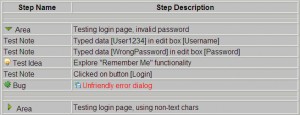
And here’s the source code of the script
XSL Source
<xsl:stylesheet version="1.0" xmlns:xsl="http://www.w3.org/1999/XSL/Transform"
 xmlns:xs="http://www.w3.org/2001/XMLSchema">
<!-- variables -->
<xsl:variable name="CHAR_SPC"> </xsl:variable>
<xsl:template match="/">
<html>
<head>
<LINK REL="STYLESHEET" HREF=".\logstyle.css" TYPE="text/css" />
<script type="text/javascript" src=".\LogView4.js"></script>
<title>automation-beyond.com | TestLog XML/XSL Transformation Example by </title>
</head>
<body bgcolor="#c0c0c0">
<H1 align="center">Test Log</H1>
<H4 align="center">XML/XSL Transformation Example by <A HREF="http://automation-beyond.com/about/"></A></H4>
<BR />
<P />
<h3 align="center">Test Steps</h3>
<BR />
<TABLE id="automation-beyond-2010" BORDER="1" width="650" align="center">
<TR>
 <TH width="150">Step Name</TH>
 <TH width="500">Step Description</TH>
</TR>
<xsl:for-each select="log/area">
 <xsl:call-template name="Display_Area">
 <xsl:with-param name="AttrDisplay">display:block</xsl:with-param>
 </xsl:call-template>
</xsl:for-each>
</TABLE>
<BR />
<BR />
<BR />
<BR />
<div class="PageBottomLine" align="center">
<A HREF="http://automation-beyond.com/chapters/tutorials/test-reports/">Home</A>
</div>
<BR />
</body>
</html>
</xsl:template>
<!-- **************Sub-Templates****************************************** -->
<!-- **************Area****************************************** -->
<xsl:template name="Display_Area">
 <xsl:param name="AttrDisplay"/>
<TR style="display:none">
 <xsl:attribute name="id"><xsl:value-of select = "@id" />-W010</xsl:attribute>
 <TD valign="bottom" colspan="2">
 <HR />
 </TD>
</TR>
<TR>
 <xsl:attribute name="style"><xsl:value-of select = "$AttrDisplay" /></xsl:attribute>
 <xsl:attribute name="id"> <xsl:value-of select = "@id" /> </xsl:attribute>
 <TD valign="bottom">
 <IMG src=".\right1.png" onmouseover="this.style.cursor='hand'" >
 <xsl:attribute name="id"><xsl:value-of select = "@id" />-I010</xsl:attribute>
 <xsl:attribute name="onClick">ShowHide('<xsl:value-of select = "@id" />')</xsl:attribute>
 </IMG>
 Area
 </TD>
 <TD><xsl:value-of select = "description" /></TD>
</TR>
 <xsl:for-each select="step">
 <xsl:choose>
 <xsl:when test = " @type = '#note' ">
 <xsl:call-template name="Display_Note">
 <xsl:with-param name="AttrDisplay">display:none</xsl:with-param>
	</xsl:call-template>
 </xsl:when>
 <xsl:when test = " @type = '#idea' ">
 <xsl:call-template name="Display_Idea">
 <xsl:with-param name="AttrDisplay">display:none</xsl:with-param>
	</xsl:call-template>
 </xsl:when>
 <xsl:when test = " @type = '#bug' ">
 <xsl:call-template name="Display_Bug">
 <xsl:with-param name="AttrDisplay">display:none</xsl:with-param>
	</xsl:call-template>
 </xsl:when>
 <xsl:otherwise>
 <TR>
 <TD>Error</TD>
 <TD>XML data error</TD>
 </TR>
 </xsl:otherwise>
 </xsl:choose>
 </xsl:for-each>
<TR style="display:none">
 <xsl:attribute name="id"><xsl:value-of select = "@id" />-W020</xsl:attribute>
 <TD valign="bottom" colspan="2">
 <HR />
 </TD>
</TR>
</xsl:template>
<!-- **************Test Note****************************************** -->
<xsl:template name="Display_Note">
 <xsl:param name="AttrDisplay"/>
 <TR>
 <xsl:attribute name="style"><xsl:value-of select = "$AttrDisplay" /></xsl:attribute>
 <xsl:attribute name="id"> <xsl:value-of select = "@id" /> </xsl:attribute>
 <TD>
 <xsl:attribute name="title"><xsl:value-of select = "time" /></xsl:attribute>
 Test Note
 </TD>
 <TD><xsl:value-of select = "description" /><xsl:value-of select = "$CHAR_SPC" /></TD>
 </TR>
</xsl:template>
<!-- **************Test Idea****************************************** -->
<xsl:template name="Display_Idea">
 <xsl:param name="AttrDisplay"/>
 <TR>
 <xsl:attribute name="style"><xsl:value-of select = "$AttrDisplay" /></xsl:attribute>
 <xsl:attribute name="id"> <xsl:value-of select = "@id" /> </xsl:attribute>
 <TD>
 <xsl:attribute name="title"><xsl:value-of select = "time" /></xsl:attribute>
 <IMG src=".\test_idea.png" />
 Test Idea
 </TD>
 <TD><xsl:value-of select = "description" /><xsl:value-of select = "$CHAR_SPC" /></TD>
 </TR>
</xsl:template>
<!-- **************Logged Bug****************************************** -->
<xsl:template name="Display_Bug">
 <xsl:param name="AttrDisplay"/>
 <TR>
 <xsl:attribute name="style"><xsl:value-of select = "$AttrDisplay" /></xsl:attribute>
 <xsl:attribute name="id"> <xsl:value-of select = "@id" /> </xsl:attribute>
 <TD>
 <xsl:attribute name="title"><xsl:value-of select = "time" /></xsl:attribute>
 <IMG src=".\bug.png" />
 Bug
 </TD>
 <xsl:choose>
 <xsl:when test=" flags/@screenshot = 'YES' ">
 <TD>
 	 <xsl:attribute name="title">Click on the link to view the image attached</xsl:attribute>
	 <A style="text-decoration: none" TARGET="_blank">
		 <xsl:attribute name="href">
		 <xsl:value-of select="screenshot" />
		 </xsl:attribute>
 <IMG border="0" src=".\picture_save.png" onmouseover="this.style.cursor='hand'" />
 </A>
 <xsl:value-of select = "$CHAR_SPC" />
 <span class="stFAIL_m1"><xsl:value-of select = "description" /></span>
 </TD>
 </xsl:when>
 <xsl:otherwise>
 <TD>
 <span class="stFAIL_m1"><xsl:value-of select = "description" /><xsl:value-of select = "$CHAR_SPC" /></span>
 </TD>
 </xsl:otherwise>
 </xsl:choose>
 </TR>
</xsl:template>
</xsl:stylesheet>
Last but not least, the package containing the original XML, XSL, CSS, and image files.
